


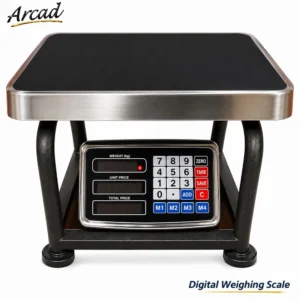
The 200 kg digital platform weighing scale is designed for routine weighing at warehouses, packing stations and dispatch areas. The mild steel (MS) platform supports cartons, bags and containers, while the front-facing digital display keeps the reading visible as you work. Use it to check packed weights before recording them on a dispatch note or handing goods over for collection.
200 kg Digital Platform Weighing Scale Features
- 200 kg maximum capacity. Check the total load against the limit, including any container on the platform.
- Mild steel (MS) platform. The flat surface gives cartons and containers a place to sit while you check their weight.
- Digital weight display. The front panel shows the weight in kilograms so staff can read it from the front of the scale.
- Zero and Tare controls. Zero resets the empty platform before weighing. Tare subtracts the weight of an empty box or tray so you can record the weight of its contents.
Specifications
| Specification | Detail |
|---|---|
| Maximum capacity | 200 kg |
| Platform material | Mild steel (MS) |
| Readout | Digital display in kilograms |
| Controls | Zero and Tare |
| Support | Metal frame with feet |
Where to Use It
Use the 200 kg digital platform weighing scale at a packing station to check the gross weight of a sealed carton, or weigh an empty container first when you need the net weight of loose items. In a warehouse, it can help staff verify incoming packages and record weights before stock is moved into storage. For cargo and logistics teams, place it near the dispatch bench so the weight can be checked before a parcel is labelled.
For wholesale stock handling, the 200 kg digital platform weighing scale can also be used to compare the weights of packed bags or batches before they are grouped for delivery. If you need the reading for invoicing by weight or another regulated task, ask ARCAD to confirm whether the unit meets your application requirements.
How to Weigh a Carton or Container
- Set the scale on a firm, level surface with all feet supported.
- Switch it on, clear the platform and check that the display reads zero.
- Place the load gently in the centre. For net weight, put an empty container on the platform and press Tare before adding the contents.
- Wait for the reading to settle. Record the weight, then remove the load and check that the display returns to zero before weighing again.
Keep packages clear of nearby walls or benches while weighing. If part of a carton rests on another surface, that surface can support some of its weight and change the reading. When using a large box, check that it can sit securely on the platform without tipping or touching surrounding equipment.
Choosing the Right Capacity
Before choosing the 200 kg digital platform weighing scale, compare your heaviest usual load with its capacity. Include the weight of boxes, bins or trays so the loaded container stays within capacity. If you mainly weigh smaller items, tell ARCAD the smallest weight difference you need to detect so the team can help you choose the right scale for that task.
Frequently Asked Questions
Does the 200 kg limit include the container?
Yes. The limit applies to everything physically on the platform. Using Tare changes the displayed net reading, while the scale still supports the container and its contents together.
Can I check fit before ordering?
Yes. Tell ARCAD the size and approximate gross weight of your largest usual box, bag or container. The team can help you check platform fit and discuss the scale for your packing setup.
Browse the ARCAD Hardware shop or contact ARCAD Dubai on WhatsApp for availability and help choosing a scale.

Reviews
There are no reviews yet.