


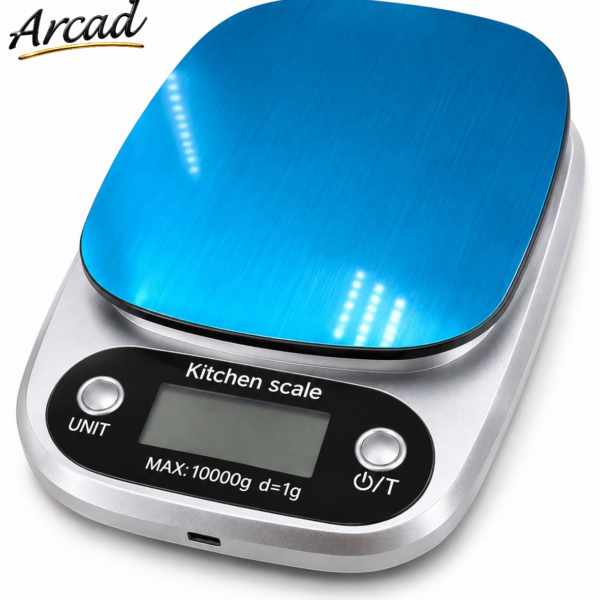
The 10 kg digital kitchen scale is a compact countertop scale for weighing recipe ingredients, portions and small containers. It has a stainless steel platform, a front-facing LCD and a tare control. Use grams when following a recipe, or select another supported unit using the Unit button. The scale is shown in blue and silver finishes.
10 kg Digital Kitchen Scale Features
- 10 kg maximum capacity. The capacity includes everything placed on the platform, including the bowl or tray.
- 1 g display graduation. In gram mode the displayed reading changes in 1 g increments.
- Stainless steel platform. The flat surface supports bowls, plates and small containers that fit securely on it.
- LCD and tare function. The front display shows the weight and selected unit. Tare lets you subtract the weight of an empty container when you need the weight of its contents.
- Battery or USB power. The product packaging information lists two AAA batteries and a USB cable in the box.
Specifications
| Specification | Detail |
|---|---|
| Maximum capacity | 10 kg (10,000 g) |
| Display graduation | 1 g in gram mode |
| Platform | Stainless steel |
| Display | Digital LCD |
| Functions | Tare, unit selection and automatic shut-off |
| Units shown on product information | g, oz, ml, ct, kg, tl, fl oz and lb |
| Power | 2 × AAA batteries or USB power |
| Colours shown | Blue and silver |
4 Easy Steps to Weigh Ingredients
- Set the scale on a firm, level countertop.
- Turn it on, wait for zero and choose the unit your recipe uses.
- Place an empty bowl in the centre and press Tare. Wait until the display returns to zero.
- Add the ingredients gradually and read the display once the weight settles.
Using the Scale for Recipes and Portions
Use the 10 kg digital kitchen scale to weigh flour for baking, divide dough into portions or measure ingredients before cooking. Keep the bowl clear of nearby equipment so its entire weight rests on the platform. For recipes with several ingredients, you can tare between additions to measure each new ingredient separately. Keep the total weight of the bowl and everything in it within the 10 kg limit.
When sorting or portioning batches, weigh an empty container first and use containers of the same type for a consistent workflow. If you switch bowls, clear the previous tare and tare the new bowl before adding ingredients. Check the unit symbol after switching modes so you record the reading in the unit you intended.
Weighing Packaged Portions
Use the 10 kg digital kitchen scale to check portion weight before packing. Place the empty bag, tray or container on the platform and tare it, then add the portion and record the reading. If you need the weight of the finished package for a stock or dispatch record, clear the tare, zero the empty platform and weigh the sealed package as a whole.
Frequently Asked Questions
Does the 10 kg limit include the bowl?
Yes. The 10 kg digital kitchen scale supports up to 10 kg in total. Tare changes what the display shows, while the bowl and its contents still count towards capacity.
Can I use grams instead of a volume mode?
Yes. Use grams when a recipe provides ingredient weights. The weight of a given volume varies by ingredient, so follow your recipe’s unit when measuring.
How do I keep the platform clean?
Use a bowl or tray for loose ingredients. Remove spills from the platform after use and keep liquid away from the display and power connection.
Browse the ARCAD Hardware shop or contact ARCAD Dubai on WhatsApp to ask about colour availability.


Reviews
There are no reviews yet.