
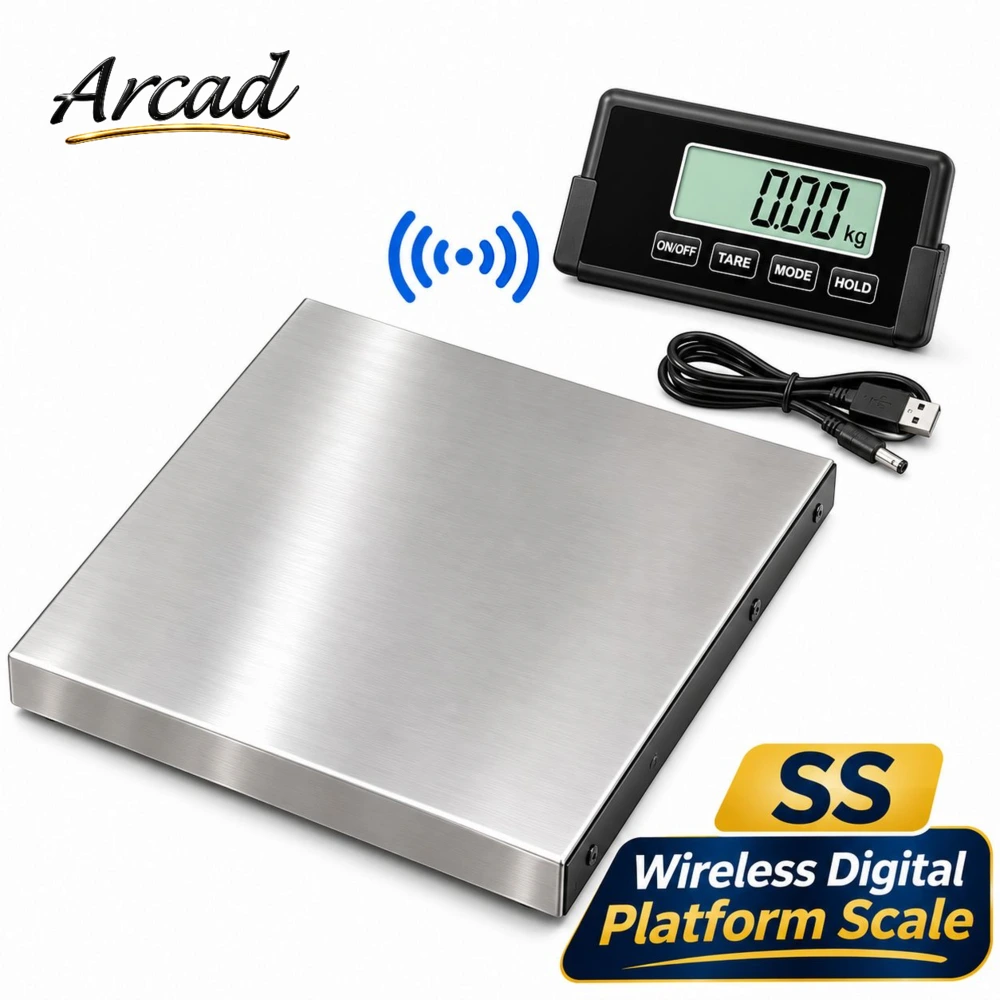

The 300 kg wireless digital platform scale pairs a low-profile stainless steel (SS) platform with a separate LCD display. Place a carton, bag or container on the platform and read its weight from the separate indicator. This layout is useful at packing and dispatch stations where a bulky carton could otherwise block the operator’s view of a display mounted next to the load.
300 kg Wireless Digital Platform Scale Features
- 300 kg maximum capacity. The limit includes the container, its contents and anything else resting on the platform.
- Stainless steel platform. The flat, low-profile surface supports cartons, crates and other loads that sit securely on it.
- Separate wireless LCD display. Position the indicator where the operator can see the reading while handling or labelling the goods.
- Tare function. Subtract the empty container weight when you need the net weight of its contents.
Specifications
| Specification | Detail |
|---|---|
| Maximum capacity | 300 kg |
| Platform | Low-profile stainless steel (SS) |
| Indicator | Separate wireless LCD display |
| Weight unit | Kilograms (kg) |
| Weighing control | Tare |
| Power accessory shown | USB power cable |

Where to Use It
At a packing station, use the 300 kg wireless digital platform scale to record the gross weight of a sealed carton before printing its dispatch label. Warehouse teams can use the scale at goods receipt to check incoming boxes or at dispatch to record the weight of outbound stock. Courier and cargo teams can weigh securely placed parcels or luggage before preparing them for collection.
The separate indicator is especially useful when one person loads cartons and another records weights. Set the display where it is easy to read from the working position and check the reading before removing each load.
4 Easy Steps to Weigh a Package
- Place the platform on a firm, level surface and position the wireless indicator where you can see it.
- Switch on the scale. With the platform empty, check that the indicator shows zero. If you need net weight, put the empty container on the platform and press Tare.
- Set the goods gently in the centre. Keep the load clear of nearby surfaces so all of its weight rests on the platform.
- Wait for the display to settle, record the weight and remove the load before weighing the next package.
Choosing the Right Scale for Your Packing Station
Before ordering the 300 kg wireless digital platform scale, check your largest package footprint and your heaviest gross load. Include the weight of any crate or bin used for weighing. If your work depends on a particular platform size, display range or graduation, share those requirements with ARCAD to check suitability before ordering.
Gross and Net Weight at Dispatch
Use gross weight when the dispatch label needs the weight of the shipment as packed. Use net weight when your stock record needs the contents alone. When switching to a different carton or tray, clear the previous tare and weigh the new empty container first. Record which type of weight you measured so the dispatch team can use the correct figure.
Frequently Asked Questions
Does Tare increase the scale’s capacity?
Tare changes the reading so you can see net weight. The 300 kg maximum still applies to the full load on the platform, including the container.
Can I use the scale for reading packed carton weights?
Yes. Put the full sealed carton on an empty, zeroed platform to read its gross weight. Set the separate LCD where you can read it clearly while recording dispatch details.
Browse the ARCAD Hardware shop or contact ARCAD Dubai on WhatsApp for availability and assistance choosing a platform scale.

Reviews
There are no reviews yet.